
Download TWINO – Investment Management, Portfolio Builder, Auto-Invest, Cash Flow Forecast
Overview
TWINO is a free Android application designed to simplify investment management for individuals seeking a streamlined way to monitor and grow their assets. Developed by TWINO IT, the software falls under the Business & Productivity category and targets users interested in personal finance and investment tracking. The app enables users to oversee their investment portfolios in real time, providing visibility into performance metrics and returns. With features such as portfolio diversification through multiple loan investments, TWINO supports users in building balanced investment strategies. The platform also includes an Auto-Invest function that allows users to set up and manage automated investment portfolios with minimal manual intervention. Push notifications keep users informed about changes in their investment profile, ensuring timely awareness of key developments. Additionally, TWINO offers a cash flow forecast tool to assist users in financial planning and decision-making. Users can access detailed account statements to review transaction history and investment activity. The software is intended for both novice and experienced investors who want a centralized, user-friendly solution for managing investment activities on mobile devices. The developer did not provide additional details on the app’s underlying technology or backend infrastructure.Key Features & Capabilities
- Real-Time Investment Tracking: Users can monitor the performance of their investments with up-to-date data, enabling informed decisions based on current market conditions.
- Portfolio Builder: This feature allows users to invest in multiple loans, promoting portfolio diversification and risk mitigation across different investment opportunities.
- Auto-Invest Setup & Updates: Users can configure automatic investment portfolios and adjust settings as needed, reducing the need for manual input and increasing consistency in investment strategies.
- Push Notifications: The app delivers timely updates and alerts directly to users’ devices, ensuring they remain informed about their investment status and important changes.
- Cash Flow Forecast: TWINO provides a forecast of future cash flows, helping users anticipate income and plan their financial goals effectively.
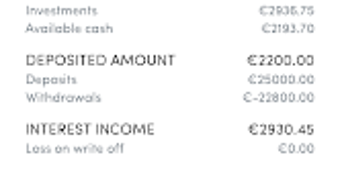
- Account Statement Access: Users can retrieve detailed records of their investment transactions and historical activity for auditing, analysis, or personal review.
- Integrated Support System: A built-in support feature allows users to contact the development team for assistance, enhancing user experience and problem resolution.
User Interface, Workflow & Performance
The user interface of TWINO is designed for clarity and ease of navigation, focusing on essential investment data and actions. The layout appears structured, with intuitive access to core features such as portfolio performance, investment history, and forecast tools. Navigation is likely streamlined to minimize user effort, aligning with typical mobile app design standards. Users can expect a workflow that begins with portfolio setup, followed by real-time monitoring and periodic review of performance and forecasts. The Auto-Invest feature integrates smoothly into this workflow, allowing users to define rules and schedules without disrupting the main interface. Performance observations are based on general software behavior patterns. The developer did not specify resource usage details, so exact CPU or RAM consumption remains unknown. Stability is assumed to be consistent with standard Android applications, though no formal testing data was provided. The app operates within the constraints of the Android ecosystem, relying on background services for notifications and data updates. The user experience is optimized for mobile use, with responsive design elements and touch-friendly controls.Compatibility & System Requirements
TWINO is available exclusively for Android devices. The app is designed to run on the Android operating system, though specific version requirements were not listed. Installation size and hardware specifications were not provided by the developer. Compatibility information was partially provided, indicating that the software is intended for mobile platforms. The developer did not specify minimum screen resolution, processor type, or memory requirements. Users should ensure their device meets general Android app standards to run the application smoothly. The software is distributed through the Google Play Store, which enforces basic compatibility checks during installation. Exact system requirements were not listed.Pros and Cons
Pros
- Free to download and use, making it accessible to a wide audience.
- Real-time investment tracking provides up-to-date performance insights.
- Portfolio Builder supports diversification through multiple loan investments.
- Auto-Invest functionality reduces manual effort and promotes consistency.
- Push notifications keep users informed about critical updates.
- Cash flow forecast aids in long-term financial planning.
- Account statement feature enhances transparency and record-keeping.
Cons
- Only available on Android, limiting access for iOS users.
- Exact system requirements were not specified.
- Performance details, including resource usage, were not disclosed.
- Limited information on data security and encryption practices.
- No desktop version available for users preferring PC software.
FAQ Section
Is TWINO available for iOS devices?
Currently, TWINO is only available for Android devices. There is no official iOS version released.
Is TWINO a secure application?
The developer did not provide detailed information about security protocols or data encryption. Users are advised to review the app’s privacy policy and permissions before use.
How often are investment updates provided?
TWINO delivers real-time updates on investment performance. The frequency of updates depends on the app’s backend synchronization and network conditions.
Can I update my Auto-Invest settings after setup?
Yes, users can modify their Auto-Invest portfolio configurations at any time through the app’s settings or portfolio management section.
Is TWINO a free software?
Yes, TWINO is available for free download and use on the Google Play Store. There is no indication of premium features requiring payment.







